
This guide breaks down how operating systems (OS) are structured and how their key components work together. From process handling to memory control and device communication, understanding these fundamentals is essential for developers aiming to build efficient, system-level applications.
Table of Contents
ToggleWhat Is an Operating System?
An operating system is the backbone of any computer system. It manages both hardware and software while acting as a bridge between the user and the machine. Without it, running applications or interacting with hardware would be nearly impossible.
Core Functions of an Operating System
-
Process Management: Handles the creation, scheduling, and termination of processes
-
Memory Management: Allocates and tracks system memory efficiently
-
File System Management: Organizes and controls data storage and retrieval
-
Device Management: Enables communication between software and hardware
-
User Interface: Provides a way for users to interact with the system (CLI or GUI)
Types of Operating System Architecture
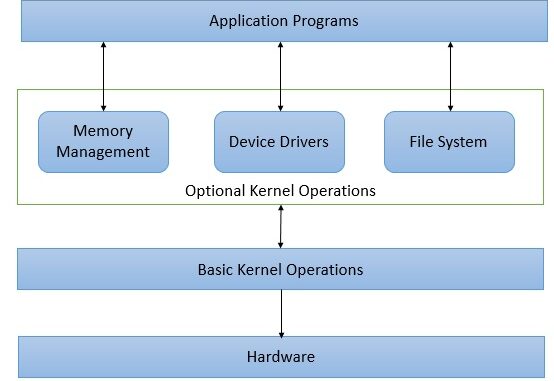
The architecture of an OS defines how its components are arranged and how they interact.
1. Monolithic Architecture
In this design, the entire operating system runs in a single space (kernel mode), with full access to hardware.
Pros:
-
Faster performance due to fewer interruptions
-
Simple system call handling
Cons:
-
Difficult to maintain and debug
-
Changes in one part can affect the whole system
2. Microkernel Architecture
This approach keeps only essential functions in the kernel, while other services run separately in user mode.
Pros:
-
Better security and system stability
-
Easier updates and modular design
Cons:
-
Slower performance due to communication overhead
-
More complex system interactions
Key Components of an Operating System
1. Process Management
This component manages how processes are created, executed, and terminated. A process is simply a program in action.
Example:
A web server handling multiple users processes each request separately while efficiently distributing CPU time.
2. Memory Management
It controls how memory is assigned and freed, ensuring smooth program execution.
Techniques include:
-
Paging: Dividing memory into fixed-size blocks
-
Segmentation: Splitting memory based on logical sections
3. File System
The file system organizes data on storage devices, allowing users to create, access, and manage files.
Common Types:
-
FAT – Simple and widely used
-
NTFS – Advanced features for Windows systems
-
ext4 – Popular in Linux environments
4. Device Drivers
These are specialized programs that allow the OS to communicate with hardware devices.
Example:
A printer driver ensures your document is correctly translated and printed, regardless of the printer model.
5. User Interface (UI)
The UI is how users interact with the system.
-
CLI (Command-Line Interface): Text-based interaction (e.g., terminal commands)
-
GUI (Graphical User Interface): Visual interface with icons and windows
Best Practices for Developers
-
Learn system calls: Understand how your OS communicates with applications
-
Optimize performance: Use memory and CPU resources efficiently
-
Handle errors properly: Build resilient applications that interact smoothly with the OS
-
Stay updated: Keep up with evolving OS technologies, especially for cross-platform development
Final Thoughts
Understanding operating system architecture isn’t just theoretical—it’s a practical advantage. Knowing how processes, memory, file systems, and drivers work together allows developers to build faster, more reliable, and scalable applications.
By mastering these fundamentals, you gain deeper control over how software interacts with hardware—making you a more capable and confident developer.